
Blog / New Chevy Tech Features

Blog

All New Chevy Tech Features Crain Chevrolet Crain Chevrolet Service Little Rock Chevrolet Dealer Little Rock Chevrolet Service Chevrolet Financing Chevy Safety Features New Chevy SUV Chevy Maintenance Tips 2025 New Chevy SUVs Chevy vs Competitors 2025 Silverado Certified Pre-Owned Chevrolet AC Service Chevy Technology Little Rock Car Engine Repair Little Rock Catalytic Converter 2025 Silverado EV Crain Buys Cars Finance
Screenshot 2024-08-23 at 3.07.53 PM

What is Chevy SuperCruise

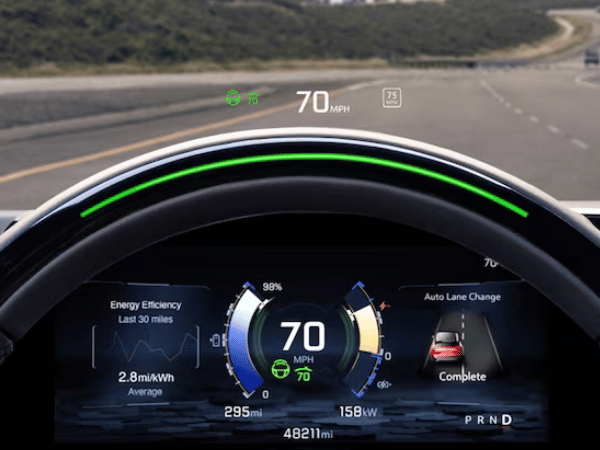
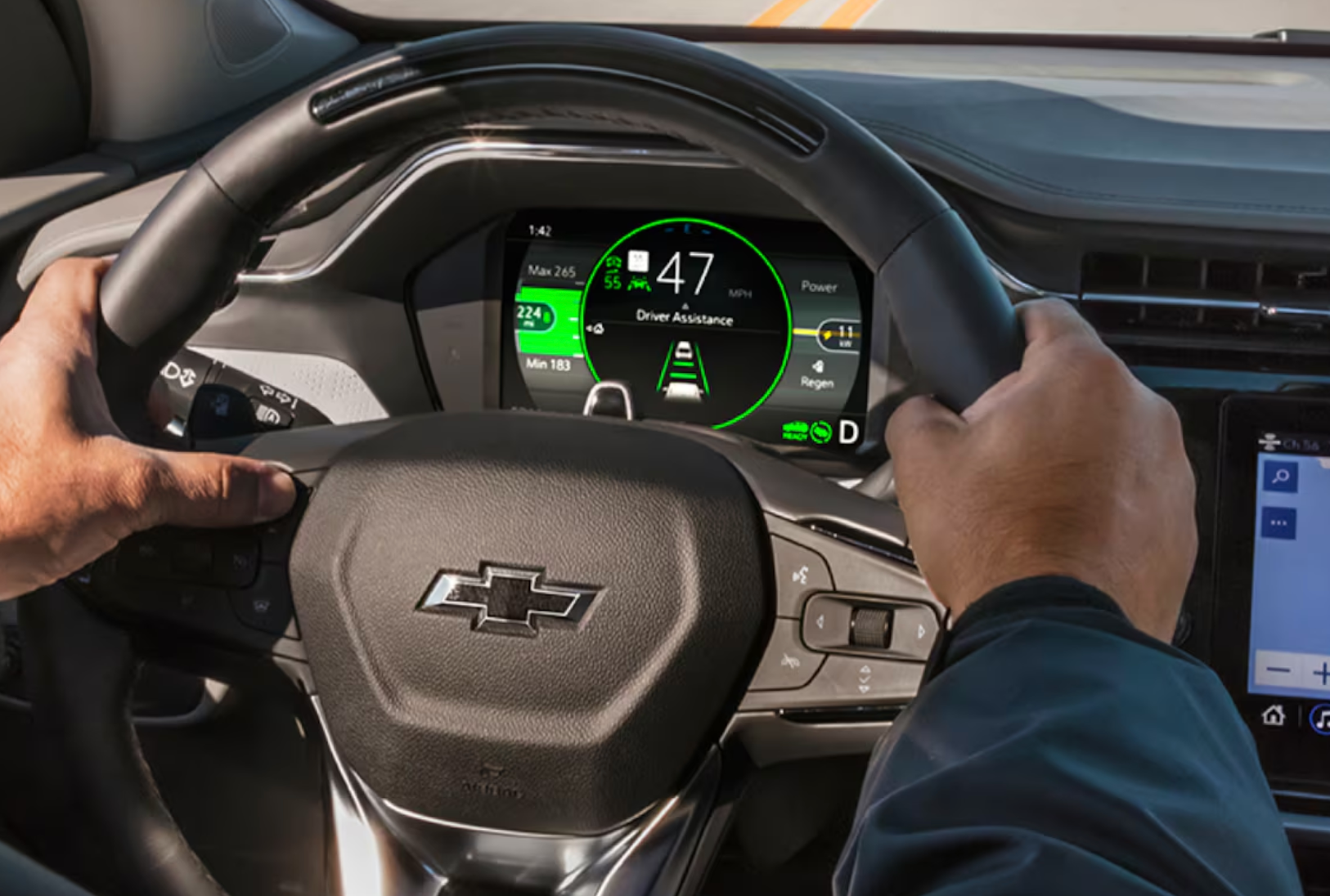
Chevy is making waves with its advanced technology. One of the best tech features the company produces is the Chevy SuperCruise, which combines cutting-edge technologies to make Chevy vehicles easier to drive. If you want to know more about the Chevy SuperCruise, keep reading! Chevy SuperCruise Teslas aren’t the only vehicles with hands-free driving assistance. Chevy SuperCruise is currently being offered on the latest Chevy vehicles. This lets you take your hands off the wheel on compatible roads. It uses Precision Lidar-mapped data, plus real-time camera sensors and GPS that keep the vehicle in its lane. The adaptive cruise control takes over the braking and acceleration to ensure your vehicle stays at a reasonable following distance. You might be wondering, “How do I turn it on?” Using Chevy SuperCruise The first step to using SuperCruise is turning it on by pressing the adaptive cruise control button and looking for the icon on the driver information center. The option will show up in white on the display. If the speed is already set, the icon will turn green along with the chosen speed. Next, center your vehicle so the SuperCruise symbol turns white. Then, press the SuperCruise button on the steering wheel. Don’t take your hands off the steering wheel until the light bar turns green. Once you see the green light, SuperCruise is activated. Also, if you didn’t set your speed previously, SuperCruise will automatically set your current speed as the cruise speed. When you need to take over driving, just place your hands back on the steering wheel and start to steer. You will then see the green light bar flash blue. When you want to return to SuperCruise, center the vehicle in its lane and wait for the bar to turn green. Next, let’s go over how to turn it off. Turning Off the Chevy SuperCruise Turning Chevy SuperCruise off is quite simple. You will need to press the SuperCruise button again, step on the brakes, or pull down the Regen on Demand paddle. NOTE: Even though Chevy SuperCruise is driving for you, you must always be attentive. If the system needs to be turned off and you need to take over quickly, the same bar will flash red and alert you with a beeping noise. If you don’t respond or are unsure what to do, Chevy SuperCruise will play a voiceover notifying you that you need to take over. If there is still no response, it will automatically steer and brake and contact help from OnStar. Can Chevy SuperCruise Be Used anytime? No. Chevy SuperCruise can only be used if: -A Chevy vehicle is on a suitable road, away from traffic -Camera and sensors are working properly -Lane markings are evident. Do you want to know more about Chevy SuperCruise's latest technology? Contact us or visit us at Crain Chevy if you have any questions!
IMG_0342-1

Chevrolet Technology in Little Rock, AR

In a rapidly changing automotive industry, you choose enhanced technology when you pick a Chevrolet vehicle. Chevy has committed to constantly improving its software and safety. At Crain Chevrolet in Little Rock, AR, we will dive into captivating reasons why a Chevy should be your choice. Our first technology feature to highlight is OnStar. OnStar Chevy OnStar has built-in sensors that will alert OnStar if you’re in a crash. This is handy because they will automatically contact you, locate your vehicle, and let first responders know where your car is located. OnStar also can update your vehicle with the latest software updates. You can keep track of your Chevy’s diagnostics with OnStar. Other features with OnStar include Google Maps, which will give you live traffic updates and the fastest routes. You can stay connected with the ultimate vehicle applications like Hulu, Spotify, and more for entertainment. Other applications like Wi-Fi hotspots can go a long way to keep your passengers entertained. The following technology Chevy has to offer is for EV lovers. EV Technology There are many reasons to go electric; the primary key is the impressive ranges, battery life, and safety. Every Chevy EV is designed precisely for its exterior and functional interior. Our EV vehicles have the power of an Ultifi EV battery. Ultifi is built on a flexible battery architecture with electrifying experiences. This EV battery is covered by an 8-year or 100,000-mile limited warranty, whichever comes first. The next feature we want to get into is the MyChevrolet Mobile App. MyChevrolet Mobile App Remember when you had to run to your vehicle to start it up before going somewhere? You can kiss those days goodbye with the MyChevrolet Mobile App. The MyChevrolet Mobile App gives you remote access to start and stop your vehicle and lock and unlock your doors. As you’re scrolling through your app, you can check the status of your tire pressure and if you need to stop to get fuel before heading out. You can find the nearest available charging station on the map for our EV owners. You can also plan the route you’re going to and decide which charging station you need to stop at. This application allows you to obtain more owner resources. The MyChevrolet Mobile App will allow you to access your Chevrolet rewards, family sharing, and more. Chevrolet rewards allow you to enroll, earn, and redeem points for services and accessories and purchase or lease a new Chevy vehicle. Using the MyChevrolet App, you can invite your family to your car. You can add up to eight family members to your Chevy vehicle and share specific commands with them. If you’re ready to take on a Chevy vehicle with updated technology, come by Crain Chevrolet in Little Rock, AR, this Spring to experience its greatness! If you have any questions about our Chevy technologies, contact us. BROWSE OUR 2024 CHEVY INVENTORY AT CRAIN CHEVROLET of LITTLE ROCK, AR HERE

the new Chevrolet Blazer EV's dashboard showing head-up display

A Closer Look at the Chevy Blazer EV's Technology

The 2024 Chevrolet Blazer EV is now available at Crain Chevrolet! It's the first ever all-electric Blazer that promises a unique combination of style, refined electric driving, and advanced technologies to elevate your driving experience. This SUV is a game-changer in the world of electric vehicles, offering cutting-edge technology designed to give you complete control and a personalized feel when you're behind the wheel. Keep reading to see what all this EV has to offer! Are you looking for a 2024 Chevy Blazer EV that's for sale near Little Rock, AR? Check out our selection of Chevy Blazer EVs by clicking here! Google Built-In The 2024 Blazer EV offers a dynamic and advanced infotainment system incorporating Google built-in. This helps make setting up your driver profile easy and allows you to personalize your driving experience. Once you have logged in with your Google Account, you can permit the system to access your account details for a free flow of information like contacts and messaging. Google will also recommend installing apps that enhance your drive for the complete experience. When Google Assist is active, it can read your messages audibly to you via voice assist. Once your Google profile is set up, you can connect your phone via Bluetooth to access your media, notifications, contacts, navigation, and more. Click here to learn about the 2024 Chevrolet Equinox EV! Charging App The Blazer EV's infotainment system offers more than the average SUV, with customization options for electric charging. This system lets you set navigational information like your home charging location, and the Google built-in and the myChevrolet app helps you search for nearby public DC Fast Charging. The charging app also lets you set charging times to take advantage of cheaper utility rates at specific times. You can also set your target charge level; Chevy recommends setting this to 80% for daily use to maximize the vehicle's battery life. However, you can raise the target charge level for longer trips. Are you shopping for a used vehicle in Central Arkansas? Click here to learn about our preowned selection of cars, trucks, and SUVs! D rive Modes If you're searching for an electric vehicle with true customization, then you'll love the Blazer EV's Drive modes! These allow you to alter the feel of your drive to fit your distinct handling and performance preferences. The preset modes prepare you for various conditions. These include Normal, Sport, Snow/Ice, and My Mode. The My Mode setting lets you set how you like your steering, brakes, and accelerator pedal to handle while driving. You can also set the simulated motor sounds inside the vehicle for a ride that's truly yours. Are you searching for a pickup truck near Benton, AR? Click here to start your Silverado search at Crain Chevrolet! The Chevy Blazer EV is a sporty car offering much more than mere looks. It is an electric marvel that allows you to customize your cabin experience for a drive explicitly tuned to your preferences for a ride unlike any before. Stop by Crain Chevrolet in Little Rock, Arkansas, to find your 2024 Chevrolet Blazer EV today!

19

5 Great Tech Features You'll Find on Today's Chevy Vehicles

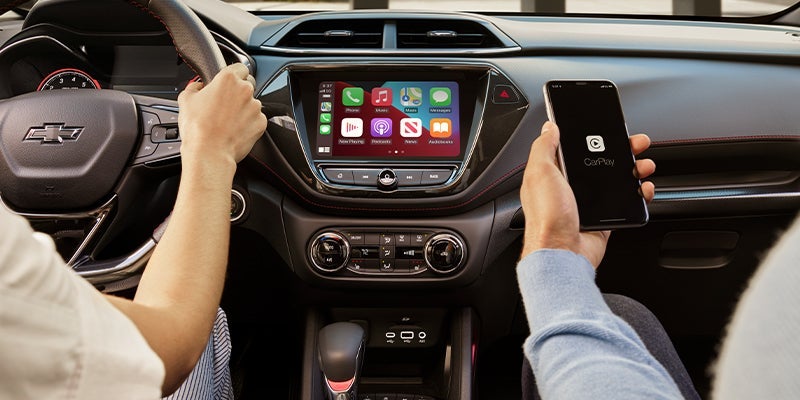
Not only are modern Chevy cars more durable, dependable, and fun to drive than ever before, but they're also far more technologically sophisticated. Let's take a look at some of the very best tech features you can enjoy in your Chevy today. If you'd like to see more, ask for a tour at your local Chevy dealership. 5 Great Tech Features You'll Find on Today's Chevy Vehicles Crystal Clear Streaming With HD streaming, you and your passengers can enjoy your favorite streaming shows or movies with crystal clear streaming on HD screens. With the Rear Set Media System available in some models, each of your passengers has their own screen and entertainment system, much like a business class seat on a plane. My Chevrolet App With the My Chevrolet App installed on your phone, you can access all kinds of car controls and details remotely. You can use your phone to locate your car, lock or unlock the doors, sound the horn, or start and stop your engine. You can also check real-time vehicle diagnostics including tire pressure, fuel level, and oil life, all from your phone. If you see something amiss, you can easily use your app to schedule servicing visits, and your phone will remind you whenever you have upcoming scheduled vehicle servicing. Google Built-in Features Your infotainment system can include Google Built-in, which provides superior navigation with Google Maps, including real-time traffic updates and effortless rerouting. The Google Voice Assistant allows you to operate most of your car's functional and entertainment features with your voice alone, and Google Play gives you access to an enormous range of apps to download and use directly in your car. Wi-Fi Hotspot for Seven Devices You can turn your Chevy into a portable Wi-Fi hotspot that provides fast streaming internet to as many as seven devices. This is perfect for staying connected while on the road, keeping everyone entertained, and even having access to the internet while out picnicking or camping. Easy Smartphone Connectivity With Android Auto and Apple CarPlay, you can seamlessly link up your phone to your car. When combined with voice commands, this allows you to control both your car and many features of your phone with voice alone. Making calls, sending messages, and navigating while driving has never been easier. Discover More In-Vehicle Tech at Your Chevy Dealer These features are just scratching the surface of all the technology in a modern Chevrolet vehicle. Visit your nearest dealership to find out more. Visit Crain Chevrolet today to learn more about your favorite Chevy models. Our friendly, knowledgeable staff are dedicated to providing exceptional and highly personalized customer service.

Contact Us

Fill out this form below and we'll contact you shortly
*Required Fields